Stránka 1 z 1
App na úpravu videa přímo v iPhone

Napsal:
úte led 17, 2012 11:56 amod Jardiik
Zdravim, chtěl bych se zeptat, zda existuje nejaka takova app na cydii... Díky za odpovědi
Re: App na úpravu videa přímo v iPhone
Napsal:
úte led 17, 2012 12:02 pmod rony
vzhladom na to, ze existuje iMovie, tak zrejme nema nikto motivaciu robit to iste a zadarmo.
Re: App na úpravu videa přímo v iPhone
Napsal:
stř led 18, 2012 12:05 pmod Jardiik
Existuje spoustu aplikaci která existuji v AppStore a podobná jsou v cydii zdarma, proto se ptám ... Taková odpověd mi je k ničemu
Re: App na úpravu videa přímo v iPhone
Napsal:
stř led 18, 2012 8:18 pmod branok
Nech sa paci, tak vymenuj tie spusty aplikacii, ja viem jedine o ReelDirectorovi. Cydiu uz nesledujem, ale kym som, tak o ziadnej na upravu videa som tam nepocul.
Re: App na úpravu videa přímo v iPhone
Napsal:
stř led 18, 2012 8:21 pmod branok
Aha, ty si myslel spusty inych ako na upravu videa ... Tak potom ti vycerpavajuco odpovedal Rony, neviem, preco ti je jeho odpoved k nicomu.
Re: App na úpravu videa přímo v iPhone
Napsal:
stř led 18, 2012 8:40 pmod bedo.
Už som tu spomínal, že jednoduchý editor videa má v sebe aj Vimeo aplikácia, a je zadarmo.
Re: App na úpravu videa přímo v iPhone
Napsal:
pát črc 17, 2015 1:27 pmod Psychos
nekdo se pta na aplikaci na video a vidim tu jenom blby keci misto tohoé aby nekdo nejakou doporucil !! to je moc

Re: App na úpravu videa přímo v iPhone
Napsal:
pát črc 17, 2015 1:34 pmod cuting
Jaké blbé kecy ? Tazatel dostal odpověď a jestli se mu nelíbí, tak existuje taková docela šikovná věc, jmenuje se tuším google.
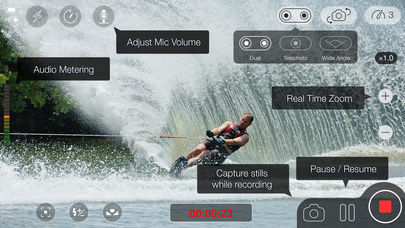
Jinak já osobně stříhám video v telefonu přímo v aplikaci na focení a nebo v aplikaci MoviePro. Ale je strašlivě drahá , stojí USD 4,99 . To je asi 125 korun. Hrůza....
https://itunes.apple.com/us/app/moviepr ... 01144?mt=8

Photo & Video
13.08.2026 15:52
Velikost: 24 MB
Cena: US$ 0
Hodnoceni: 4.40384
od 1773 lidí

Deepak Sharma
MoviePro - Pro Video Camera 10.0.1
MoviePro is a professional video camera for iPhone and iPad, built for the takes you cannot afford to miss.
Start in Auto for a calm shooting experience that keeps essential information visible and warns you when something threatens the take. Switch to Pro when you need direct control over exposure, focus, white balance, zoom and recording format.
AUTO MODE
Auto keeps the interface clear while the camera manages exposure and white balance.
• Tap to set focus and exposure
• Lock white balance with one tap
• Check microphone, storage and recording readiness before you roll
• See clear warnings before technical problems ruin the take
PRO MODE
Take direct control when the shot demands it.
• Manual rails for ISO, shutter, white balance, tint, focus and zoom
• Set A/B focus and zoom points for controlled pulls
• Focus peaking, zebras and framing guides
• Presets for interviews, field reports, performances, studio recording and Log
• Organize recordings by project, camera, scene and take
PRO CAPTURE
• ProRes, HEVC and H.264
• Apple Log and 10-bit HDR
• ProRes RAW on supported devices
• Cinematic and high-frame-rate recording
• Exact NTSC frame rates — 23.98, 29.97 and 59.94 fps — in Pro Mode
• Ultra Wide, Wide and Telephoto lens selection
Available formats, frame rates and lenses depend on your device.
LIVE MONITORING
See both the image and the health of the recording system while you shoot.
• Waveform, vectorscope, RGB parade and histogram
• Live audio meters with the active microphone always visible
• Focus, exposure and framing assists
• Clean HDMI output to compatible external displays
• Storage, thermal and recording-health information
DUAL CAPTURE
Record the front and rear cameras together using split-screen or picture-in-picture layouts on supported devices.
REMOTE CONTROL
Use another iPhone as a remote controller and live monitor—without installing a separate Remote app.
Install MoviePro on both devices, connect them to the same Wi-Fi network or Personal Hotspot, then assign one as the camera and the other as the controller.
The Apple Watch companion can also start, stop and monitor recording from your wrist.
TAKE RECEIPTS
After recording, MoviePro shows what was actually captured, including format, frame rate, audio source and important warnings.
Confirm the take before leaving the location, while there is still time to record it again.
AUDIO MONITORING
• See the active microphone and audio levels before and during recording
• Receive a warning if the microphone disconnects during a take
• Use supported wired, USB-C and Bluetooth microphones
LIBRARY AND iPAD
• Review recordings with their Take Receipts
• Mark favorite takes and find useful clips quickly
• Use complete iPad layouts in portrait and landscape
FREE AND PRO
Auto recording is free.
You can explore the complete Pro interface—including controls, scopes, presets and settings—before purchasing.
Unlock recording in Pro, Dual Capture and Remote Control with a one-time lifetime purchase. The 7-day Pro Pass provides the same access for seven days and does not auto-renew. No subscription is required.
Existing MoviePro purchases carry forward.
Terms of Use: https://www.apple.com/legal/internet-services/itunes/dev/stdeula/
Privacy Policy: https://www.moviepro.app/Privacy-Policy.html
Support: support@moviepro.app
VÍCE O APLIKACI

Re: App na úpravu videa přímo v iPhone
Napsal:
ned črc 26, 2015 10:22 amod Clon
Mimo to se tazatel ptal v lednu 2012 a dost pochybuju, že dneska ho to ještě zajímá. Kdyby ano, určitě NĚJAK SLUŠNĚ vlákno "oživí"
Navíc si nejsem jist, proč takovou aplikaci shánět zrovna ve vlákně o JB a aplikacích z Cydie.
Re: App na úpravu videa přímo v iPhone
Napsal:
stř črc 29, 2015 3:36 pmod Psychos
ja zrovna shanej nejakou takovou app a cekal jsem ze tu bude nejaka doporucena aspon....ze je to v sekci cydia jsem si nevsimnul no.....
