Days off tracker
 Napsal: stř kvě 24, 2017 12:27 pm
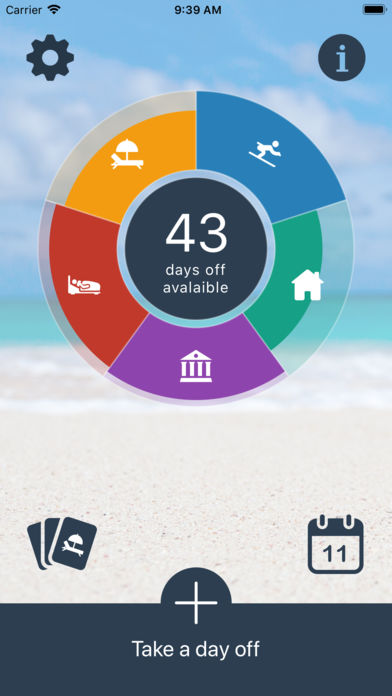
Pre vsetkych ktori si nepamataju kedy cerpali ake volno  ... a v cestine a slovencine
https://itunes.apple.com/us/app/days-off-tracker/id1225040070?mt=8


VÍCE O APLIKACI

... a v cestine a slovencine https://itunes.apple.com/us/app/days-off-tracker/id1225040070?mt=8
Business
05.11.2026 12:55
Velikost: 15 MB
Cena: US$ 0
Hodnoceni: 4.11428
od 35 lidí
od 35 lidí
Tomas Pollak
Time Tracker: Work & Leave 2.2.0
Know exactly how many vacation days you have left, how much overtime you've built up and how often you worked from home. Time Tracker keeps every allowance and counter in one place, and syncs it across your iPhone and iPad with iCloud.
SEE WHAT'S LEFT AT A GLANCE
• Every category is a card with a big balance, a bar for taken, planned and free time, and the date it resets
• Overbooked? The card says so, in red and in words
• Swipe a card, or touch and hold it, to record today in one move, with Undo
TRACK ANYTHING, YOUR WAY
• With a limit: count down an allowance, like 25 vacation days a year or 8 home office days a month
• No limit: just add up, like overtime hours or sick days
• Days or hours, with half days and half hours
• Resets every week, month, quarter or year, with a year that can start in any month
• 36 illustrated icons and a full colour palette
ADD SEVERAL DAYS IN ONE GO
• Pick the category, the amount and how many days the entry runs
• Skip weekends automatically
• See the balance after adding before you save
• Add a note to any entry
A CALENDAR THAT SHOWS IT ALL
• Swipe through months, with a coloured line for each category on every day
• Tap a day to see, add, edit notes or delete its records
• Jump to any date or back to today
• Two months side by side on iPad
A SUMMARY THAT TELLS THE STORY
• Tiles for the current period of every category
• A history chart by weeks, months, quarters or years
• Open any period to see its days, with consecutive days merged into one row
• Planned days apart from the days already taken
FOR YOU, YOUR FAMILY OR YOUR TEAM
• Keep separate users, each with their own categories
• Share a user with others through iCloud, so everyone sees the same numbers
• Choose who can only view and who can make changes
EXPORT AND TIDY UP
• Export all entries as a clear PDF report, year by year
• Erase the entries of a past year or a date range, while keeping your categories
MADE FOR EVERY SCREEN
• iPhone and iPad, in portrait and landscape on iPad
• On iPad and on the unfolded iPhone Duo, categories, calendar and the day's records sit side by side
• Dark Mode, Dynamic Type and full VoiceOver support
• English, Slovak and Czech
FREE AND PRO
The free version includes two categories and two users, with iCloud sync, sharing, the calendar, the summary and PDF export. PRO unlocks unlimited categories and unlimited users. One purchase, no subscription.
Your data stays in your own iCloud. There is no account to create and no ads.
SEE WHAT'S LEFT AT A GLANCE
• Every category is a card with a big balance, a bar for taken, planned and free time, and the date it resets
• Overbooked? The card says so, in red and in words
• Swipe a card, or touch and hold it, to record today in one move, with Undo
TRACK ANYTHING, YOUR WAY
• With a limit: count down an allowance, like 25 vacation days a year or 8 home office days a month
• No limit: just add up, like overtime hours or sick days
• Days or hours, with half days and half hours
• Resets every week, month, quarter or year, with a year that can start in any month
• 36 illustrated icons and a full colour palette
ADD SEVERAL DAYS IN ONE GO
• Pick the category, the amount and how many days the entry runs
• Skip weekends automatically
• See the balance after adding before you save
• Add a note to any entry
A CALENDAR THAT SHOWS IT ALL
• Swipe through months, with a coloured line for each category on every day
• Tap a day to see, add, edit notes or delete its records
• Jump to any date or back to today
• Two months side by side on iPad
A SUMMARY THAT TELLS THE STORY
• Tiles for the current period of every category
• A history chart by weeks, months, quarters or years
• Open any period to see its days, with consecutive days merged into one row
• Planned days apart from the days already taken
FOR YOU, YOUR FAMILY OR YOUR TEAM
• Keep separate users, each with their own categories
• Share a user with others through iCloud, so everyone sees the same numbers
• Choose who can only view and who can make changes
EXPORT AND TIDY UP
• Export all entries as a clear PDF report, year by year
• Erase the entries of a past year or a date range, while keeping your categories
MADE FOR EVERY SCREEN
• iPhone and iPad, in portrait and landscape on iPad
• On iPad and on the unfolded iPhone Duo, categories, calendar and the day's records sit side by side
• Dark Mode, Dynamic Type and full VoiceOver support
• English, Slovak and Czech
FREE AND PRO
The free version includes two categories and two users, with iCloud sync, sharing, the calendar, the summary and PDF export. PRO unlocks unlimited categories and unlimited users. One purchase, no subscription.
Your data stays in your own iCloud. There is no account to create and no ads.