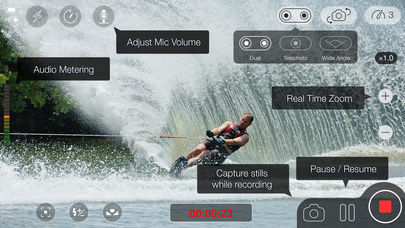
Velmi dobrou alternativou , která nabízí nejenom tuto volbu rozlišení videa ,ale i další možnosti nastavení , které v defaultní aplikaci chybí , je aplikace MoviePro. Stojí necelé tři dolary a určitě za těch pár drobných stojí.
https://itunes.apple.com/us/app/moviepr ... 01144?mt=8

Photo & Video
13.08.2026 15:52
Velikost: 24 MB
Cena: US$ 0
Hodnoceni: 4.4096
od 1770 lidí
od 1770 lidí

Deepak Sharma
MoviePro - Pro Video Camera 10.0.1
MoviePro is a professional video camera for iPhone and iPad, built for the takes you cannot afford to miss.
Start in Auto for a calm shooting experience that keeps essential information visible and warns you when something threatens the take. Switch to Pro when you need direct control over exposure, focus, white balance, zoom and recording format.
AUTO MODE
Auto keeps the interface clear while the camera manages exposure and white balance.
• Tap to set focus and exposure
• Lock white balance with one tap
• Check microphone, storage and recording readiness before you roll
• See clear warnings before technical problems ruin the take
PRO MODE
Take direct control when the shot demands it.
• Manual rails for ISO, shutter, white balance, tint, focus and zoom
• Set A/B focus and zoom points for controlled pulls
• Focus peaking, zebras and framing guides
• Presets for interviews, field reports, performances, studio recording and Log
• Organize recordings by project, camera, scene and take
PRO CAPTURE
• ProRes, HEVC and H.264
• Apple Log and 10-bit HDR
• ProRes RAW on supported devices
• Cinematic and high-frame-rate recording
• Exact NTSC frame rates — 23.98, 29.97 and 59.94 fps — in Pro Mode
• Ultra Wide, Wide and Telephoto lens selection
Available formats, frame rates and lenses depend on your device.
LIVE MONITORING
See both the image and the health of the recording system while you shoot.
• Waveform, vectorscope, RGB parade and histogram
• Live audio meters with the active microphone always visible
• Focus, exposure and framing assists
• Clean HDMI output to compatible external displays
• Storage, thermal and recording-health information
DUAL CAPTURE
Record the front and rear cameras together using split-screen or picture-in-picture layouts on supported devices.
REMOTE CONTROL
Use another iPhone as a remote controller and live monitor—without installing a separate Remote app.
Install MoviePro on both devices, connect them to the same Wi-Fi network or Personal Hotspot, then assign one as the camera and the other as the controller.
The Apple Watch companion can also start, stop and monitor recording from your wrist.
TAKE RECEIPTS
After recording, MoviePro shows what was actually captured, including format, frame rate, audio source and important warnings.
Confirm the take before leaving the location, while there is still time to record it again.
AUDIO MONITORING
• See the active microphone and audio levels before and during recording
• Receive a warning if the microphone disconnects during a take
• Use supported wired, USB-C and Bluetooth microphones
LIBRARY AND iPAD
• Review recordings with their Take Receipts
• Mark favorite takes and find useful clips quickly
• Use complete iPad layouts in portrait and landscape
FREE AND PRO
Auto recording is free.
You can explore the complete Pro interface—including controls, scopes, presets and settings—before purchasing.
Unlock recording in Pro, Dual Capture and Remote Control with a one-time lifetime purchase. The 7-day Pro Pass provides the same access for seven days and does not auto-renew. No subscription is required.
Existing MoviePro purchases carry forward.
Terms of Use: https://www.apple.com/legal/internet-services/itunes/dev/stdeula/
Privacy Policy: https://www.moviepro.app/Privacy-Policy.html
Support: support@moviepro.app
Start in Auto for a calm shooting experience that keeps essential information visible and warns you when something threatens the take. Switch to Pro when you need direct control over exposure, focus, white balance, zoom and recording format.
AUTO MODE
Auto keeps the interface clear while the camera manages exposure and white balance.
• Tap to set focus and exposure
• Lock white balance with one tap
• Check microphone, storage and recording readiness before you roll
• See clear warnings before technical problems ruin the take
PRO MODE
Take direct control when the shot demands it.
• Manual rails for ISO, shutter, white balance, tint, focus and zoom
• Set A/B focus and zoom points for controlled pulls
• Focus peaking, zebras and framing guides
• Presets for interviews, field reports, performances, studio recording and Log
• Organize recordings by project, camera, scene and take
PRO CAPTURE
• ProRes, HEVC and H.264
• Apple Log and 10-bit HDR
• ProRes RAW on supported devices
• Cinematic and high-frame-rate recording
• Exact NTSC frame rates — 23.98, 29.97 and 59.94 fps — in Pro Mode
• Ultra Wide, Wide and Telephoto lens selection
Available formats, frame rates and lenses depend on your device.
LIVE MONITORING
See both the image and the health of the recording system while you shoot.
• Waveform, vectorscope, RGB parade and histogram
• Live audio meters with the active microphone always visible
• Focus, exposure and framing assists
• Clean HDMI output to compatible external displays
• Storage, thermal and recording-health information
DUAL CAPTURE
Record the front and rear cameras together using split-screen or picture-in-picture layouts on supported devices.
REMOTE CONTROL
Use another iPhone as a remote controller and live monitor—without installing a separate Remote app.
Install MoviePro on both devices, connect them to the same Wi-Fi network or Personal Hotspot, then assign one as the camera and the other as the controller.
The Apple Watch companion can also start, stop and monitor recording from your wrist.
TAKE RECEIPTS
After recording, MoviePro shows what was actually captured, including format, frame rate, audio source and important warnings.
Confirm the take before leaving the location, while there is still time to record it again.
AUDIO MONITORING
• See the active microphone and audio levels before and during recording
• Receive a warning if the microphone disconnects during a take
• Use supported wired, USB-C and Bluetooth microphones
LIBRARY AND iPAD
• Review recordings with their Take Receipts
• Mark favorite takes and find useful clips quickly
• Use complete iPad layouts in portrait and landscape
FREE AND PRO
Auto recording is free.
You can explore the complete Pro interface—including controls, scopes, presets and settings—before purchasing.
Unlock recording in Pro, Dual Capture and Remote Control with a one-time lifetime purchase. The 7-day Pro Pass provides the same access for seven days and does not auto-renew. No subscription is required.
Existing MoviePro purchases carry forward.
Terms of Use: https://www.apple.com/legal/internet-services/itunes/dev/stdeula/
Privacy Policy: https://www.moviepro.app/Privacy-Policy.html
Support: support@moviepro.app